
Infinite Flight Managed Climb
The Airbus push, on your phone: hold the altitude selector and hand the climb to the FMS. It flies the profile, honours every crossing restriction, and levels off on its own — all narrated by a live FMA.
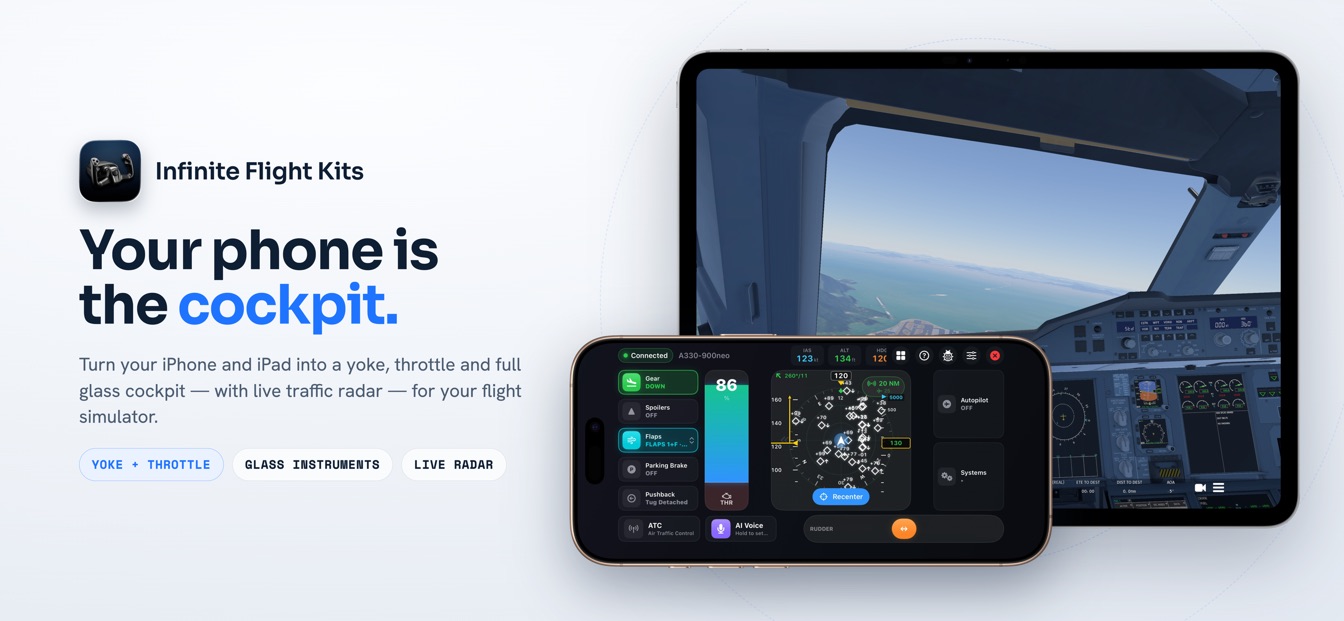
Managed climb is the Airbus "push" vertical mode. In SkyYoke you hold the ALT selector for about 0.4 seconds and a magenta ring confirms the push; the FMS then flies the climb profile, levelling off automatically at each altitude constraint in your flight plan. The FMA reads CLB, the tile dot turns magenta with a MANAGED chip, and the aircraft steps up through ALT CST constraints to ALT CRZ — the real A320 logic, driven from your iPhone.
Hold to push: the FMS flies the climb
- Hold to push — MANAGEDA 0.4 s hold; a magenta ring confirms it.
- CLB, THR CLBThe FMS flies the profile at full climb thrust.
- ALT CSTIt levels automatically at each altitude constraint.
- ALT CRZManaged all the way up to your cruise level.
On a real Airbus, the choice between climb modes is one movement of the altitude knob: pull it for an open climb, or push it to hand the climb to the flight management system. SkyYoke maps that push to a deliberate hold on the ALT selector. As your finger rests on the cell, a magenta ring sweeps around its border to show the 0.4-second long-press being recognised — the same tactile confirmation the real jet gives you through the detent of the knob. Release, and the FMS takes the climb.
Constraints, honoured automatically
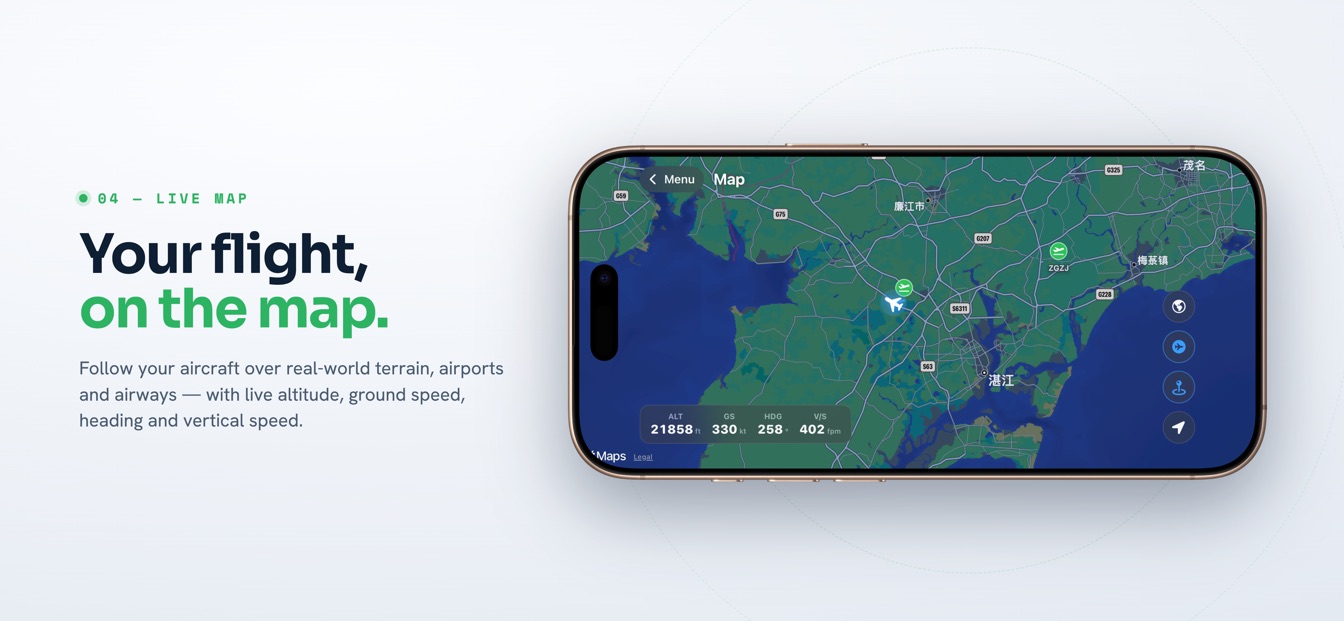
The point of a managed climb is that it flies your plan for you. Where a open climb would blow straight through a "cross ABC at or below 10,000" restriction, managed climb sees the constraint, arms it, and levels off. On the FMA you watch the sequence happen: the armed cell shows ALT CST in magenta while the constraint is still ahead, then the vertical mode captures it with ALT CST* and holds at ALT CST. Once you are past, the climb resumes on its own. It is the difference between flying a SID by hand and letting the box fly it — without touching a single knob after the initial push.
Reading the FMA: CLB, ALT CST, ALT CRZ
Infinite Flight has no Airbus Flight Mode Annunciator, so SkyYoke computes and draws one. A managed climb reads differently from an open one, and the differences are the whole point:
| Column | Reads | Meaning |
|---|---|---|
| Vertical | CLB (green) | Managed climb — no "OP" prefix, because the FMS owns the profile. |
| Thrust | THR CLB → SPEED | Full climb thrust between constraints, easing to SPEED at each level-off. |
| Armed | ALT CST (magenta) | The next altitude constraint is armed to capture. |
| Capture | ALT CST* → ALT CST | Levelling at the constraint, then holding until it clears. |
| Cruise | ALT CRZ (green) | Settled at the cruise level from the flight plan. |
Managed magenta, everywhere it matters
Airbus paints anything the FMS manages in magenta, and SkyYoke keeps that convention exactly. A managed climb shows a magenta status dot and a MANAGED chip on the tile; the managed speed target renders magenta too; and it all matches the magenta of the flight-plan route on the live map. One glance tells you whether the box is flying the profile or you are flying a selected value.
A complete Airbus autopilot in your pocket
Managed climb is one piece of a faithful Airbus flight deck. The same push-versus-pull logic gives you managed descent; the whole climb is driven by A/THR auto thrust holding THR CLB on a self-driving lever; and the descent is guarded by the Violation Avoidance System. SkyYoke is on the App Store now — download it on the App Store / Google Play and let the box fly your next climb.
Frequently asked questions
How managed climb behaves in SkyYoke, and how it differs from an open climb.
What is a managed climb in Infinite Flight?+
A managed climb is the Airbus "push" vertical mode: instead of flying straight to the selected altitude, the aircraft follows the FMS climb profile and levels off automatically at each altitude constraint along the way. In SkyYoke you engage it by holding the ALT selector for about 0.4 seconds; the FMA then shows CLB, the tile dot turns magenta, and a MANAGED chip appears.
How do I engage managed climb in SkyYoke?+
Press and hold the ALT value cell for about 0.4 seconds. A magenta ring sweeps around the cell as the long-press is recognised — that hold is the Airbus push. When it engages, the status dot turns magenta, a MANAGED chip appears next to the label, and the FMA switches to CLB. A short tap instead engages an open climb.
How does managed climb handle altitude constraints?+
Managed climb honours the crossing restrictions in your flight plan. As it reaches a constrained altitude, the armed cell shows ALT CST in magenta, then the vertical mode captures with ALT CST* and holds at ALT CST until the constraint is cleared, at which point the climb resumes. At the top it settles into ALT CRZ at your cruise level.
What is the difference between managed and open climb?+
Managed climb follows the FMS profile and levels off at each altitude constraint; open climb ignores constraints and flies straight to the selected altitude at full thrust. Both use fixed THR CLB thrust with speed on the elevator. On the FMA, managed reads CLB and open reads OP CLB; on the tile, managed shows a magenta dot and MANAGED chip while open shows a blue dot.
Why is the managed target shown in magenta?+
Magenta is the Airbus colour for FMS-managed guidance. SkyYoke follows that convention: a managed climb paints the status dot and the managed speed target magenta, matching the magenta of the flight-plan route on the map. It is an instant visual cue that the FMS is flying the profile rather than you flying a selected value.
Now on the App Store.
SkyYoke is available now — download it on the App Store and turn your iPhone into a full flight-sim cockpit.
Download on the App Store Get it on Google Play