
现已上架 App Store · iOS

把 iPhone 变成 Infinite Flight 的驾驶盘

倾斜压坡度,滑动加油门,开口即指令。SkyYoke 是一款精准飞行控制器——体感驾驶盘、油门、方向舵、 自动驾驶、ATC、空中防撞雷达与 AI 副驾——用你手中的手机驾驶模拟器。
从 App Store 下载

免费下载 · 需要运行 iOS 17.2 或更新版本的 iPhone。

通过 Wi-Fi 连接 支持 iPad + iPhone 设备端 AI
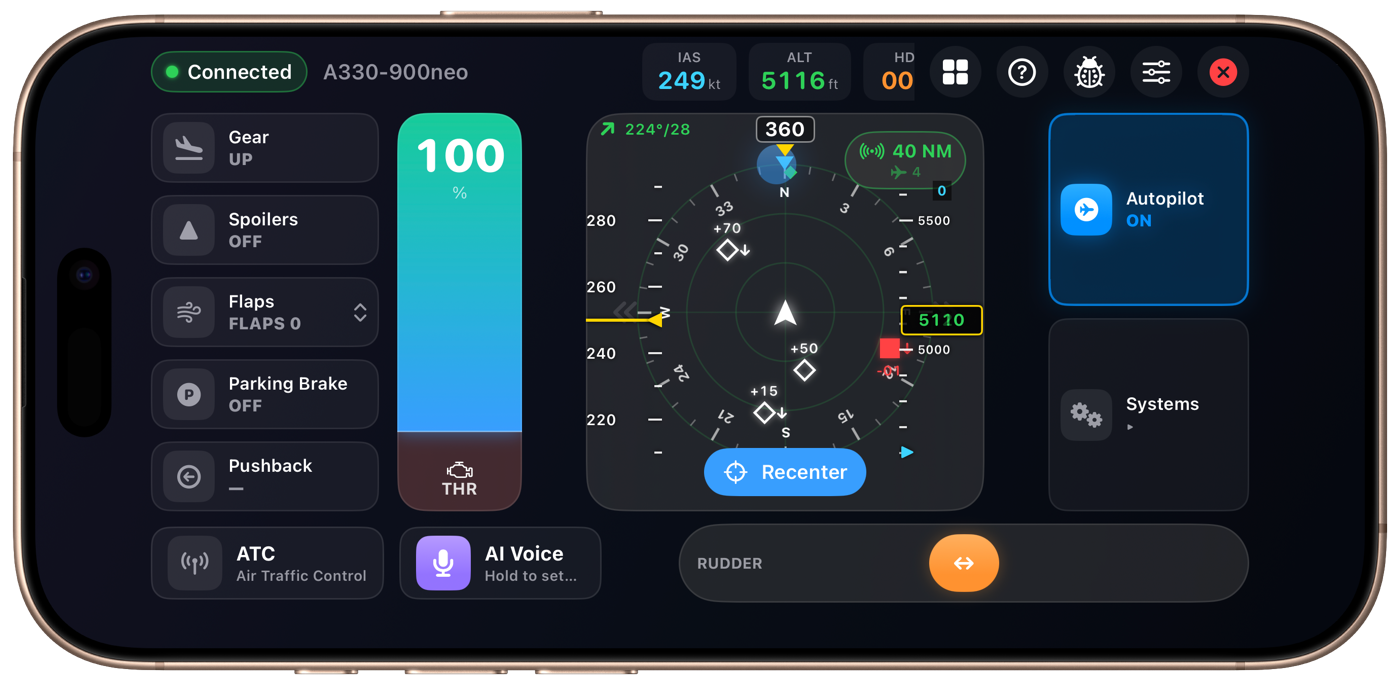
SkyYoke 运行于 iPhone,连接到一架 A330-900neo——油门 100%、空中防撞雷达画面、自动驾驶已接通、方向舵操控
倾斜即飞行
AI 语音副驾
TCAS 雷达
A320 · 体感驾驶盘 · 737 · 智能油门 · A380 · 自动驾驶 · C172 · 反推 · TCAS II · 方向舵 · A350 · VNAV · ATC 键盘 · 地面震动 · 777 · V 速度 · AI 语音 · A320 · 体感驾驶盘 · 737 · 智能油门 · A380 · 自动驾驶 · C172 · 反推 · TCAS II · 方向舵 · A350 · VNAV · ATC 键盘 · 地面震动 · 777 · V 速度 · AI 语音 ·

SkyYoke 是一款非官方——却是最出色的——Infinite Flight 模拟器 iPhone 控制器。 它通过本地 Wi-Fi 连接到另一台设备上的 Infinite Flight,把你的手机变成真正的飞行操控—— 体感驾驶盘、油门、方向舵与完整的玻璃座舱——实时驾驶飞机。

完整座舱

每一处操控,尽在掌中。

一款应用取代一整桌硬件——驾驶盘、油门台、方向舵脚舵与玻璃仪表,全部由你的 iPhone 驱动。

体感驾驶盘

倾斜手机即可压坡度与控制俯仰。基于重力的感应适用于任何握持姿势——平放在腿上,或像操纵柱一样竖握——轻点一下即可重新回中。

智能油门

一根拉杆搞定前推力、地面反推与 40 kts 以下的比例轮刹——并内置空中反推保护。

AI 语音副驾

按住,说出指令——「爬升并保持一万英尺」——它便照做。由 Apple Intelligence 驱动,转写与解析全部在设备端完成。

TCAS 空中防撞雷达

空客风格的 ND 导航显示屏,具备真实的 TCAS II 分类——邻近目标、交通咨询与决断咨询、接近率逻辑与高度抑制。

玻璃座舱 HUD

顶部实时显示 IAS、高度、航向与垂直速度,配以空客风格的速度与高度带、趋势箭头及选定值指标。

完整自动驾驶

ALT、V/S、SPD 与 HDG,滑动调节的速率会随你的速度自动缩放,另有 VNAV、LNAV、APPR 与一键高度预设。

系统与 ATC

头顶板风格的系统面板,管理电气、灯光、发动机与指示牌——以及带数字按键的 ATC 键盘和实时、带时间戳的消息记录。

性能与 V 速度

配载假设推演、跑道与模拟器内天气,以及来自 16 种机型档案的 V1 / VR / V2 估算——还有跑道长度是否足够的检查。

感受每一英尺

语音「V1 · 抬轮 · V2」唱数、随速度增强的地面震动、沉重的起落架落地闷响与跑道接缝颠簸,让模拟飞行触感十足。

几分钟即可起飞

运作方式

无需线缆,无需硬件。只要两台设备连在同一 Wi-Fi,并完成一次性设置即可。

连接

把 iPhone 和 iPad 连到同一 Wi-Fi。应用会自动发现网络上的 Infinite Flight——轻点一下即可连接。

绑定一次

在 Infinite Flight 的控制器中映射五个虚拟轴——横滚、俯仰、油门、偏航与刹车。应用内的向导会一步步带你完成。

起飞

倾斜或触摸来飞行,滑动加油门,划动环视,开口下指令。座舱以 60 Hz 响应。你就是机长。

体感操控

你的手腕就是操纵柱。

体感驾驶盘读取的是相对于你设定的中心的重力向量——而非原始角度——因此与握持姿势无关,也绝不会遇到万向锁。每轴独立的灵敏度、死区、指数曲线与平滑处理,让操控可柔可锐,随你喜好。

  • 平放、竖握、向左或向右横屏均可
  • 或切换为屏幕上的触摸驾驶盘触控区
  • 在同一触控区划动即可平移镜头
Apple Intelligence

像机长一样讲话,它也像机长一样听懂。

按住麦克风讲话。语音在设备端识别,并偏向航空标准用语;AI 第一遍纠正听错之处,第二遍将其转成精确指令——高度、航向、速度、灯光、起落架、襟翼等——然后照做。

  • 100% 设备端处理——音频绝不离开手机
  • 支持相对指令,如「下降 2,000 英尺」
  • 结果卡片会清楚显示实际执行了什么
“CLIMB AND MAINTAIN ONE ZERO THOUSAND”
玻璃座舱

读起来如同真机的仪表。

空客风格的 PFD 数据带环绕着显示屏:带黄色趋势箭头的滚动速度带、带绿色数字框的高度带、青色选定值指标,以及航向朝上的罗盘刻度——全部以 10 Hz 流畅刷新。

  • 提前 10 秒的速度趋势预测
  • 风向风速读数与选定航向指标
  • 量程环在 5 / 10 / 20 / 40 / 80 NM 之间循环
260
250
240
230
220
260
250
240
230
220
248
110
105
100
095
090
110
105
100
095
090
100
See every control work

Watch it fly, step by step.

No manual needed. Each animation walks through exactly how a control behaves — the moment you'd use it in the cockpit.

CONNECT
SAME WI-FIDISCOVEREDAXES BOUNDCLEARED FOR TAKEOFF
  1. Same Wi-FiPut your iPhone and the simulator device on one network.
  2. Auto-discoverSkyYoke finds the sim on the LAN — connect in a tap.
  3. Bind axes onceMap roll, pitch, throttle and yaw, guided step by step.
  4. FlyTilt, slide and speak to fly the aircraft in real time.
MOTION YOKE
WINGS LEVELBANK LEFTBANK RIGHTPITCH UP
  1. Hold & centreOne tap captures your grip as wings-level neutral.
  2. Tilt leftRoll the phone left and the aircraft banks left.
  3. Tilt rightRoll the other way to bank right — 1:1, smoothly.
  4. Tilt backEase the top toward you to pitch up and climb.
SMART THROTTLE
CLIMB 88%IDLEREVERSEBRAKESBLOCKED
  1. Push up — thrustThe top of the lever is forward climb power.
  2. Pull to idleA haptic click marks the idle detent.
  3. On ground, fast — reverseIn the red zone the lever holds reverse thrust.
  4. Slowing — wheel brakesBelow 40 kt the same zone becomes proportional braking.
  5. Airborne — blockedReverse in the air is locked out with a warning.
AUTOPILOT
ALT10000
HDG270
SPD250
SET ALTITUDESET HEADINGSET SPEEDAUTOPILOT ENGAGED
  1. Dial altitudeSwipe the ALT cell — the scrub rate scales with your speed.
  2. Dial headingSet the heading bug the same way.
  3. Dial speedArm the speed target with a swipe.
  4. EngageTap the master and the autopilot flies it.
TCAS
OTHER TRAFFICPROXIMATETRAFFIC, TRAFFICCLIMB, CLIMBCLEAR OF CONFLICT
  1. Other trafficDistant contacts show as open white diamonds.
  2. ProximateWithin 6 NM and 1,200 ft it fills in solid.
  3. Traffic advisoryAn amber circle and a spoken “Traffic, traffic.”
  4. Resolution advisoryA red square with a spoken “Climb, climb.”
  5. Clear of conflictThreat resolved — the callout stands you down.
AI VOICE COPILOT
Hold to talk…“Climb and maintain one zero thousand”Parsing on-device…ALT → 10,000 ft ✓ applied
  1. Hold the micPress and hold to talk — push-to-talk.
  2. Speak naturallySay it like a pilot; speech is read on-device.
  3. Parsed on-deviceApple Intelligence turns it into exact commands.
  4. AppliedThe target is set — audio never leaves your phone.
Engineered for precision

By the numbers

Built on a unit-tested protocol engine that mirrors Infinite Flight’s Connect API down to the byte.

60 Hz
Real-time control loop
1800+
API endpoints handled
16
Aircraft V-speed profiles
3
Languages — EN · 繁 · 简
±1000 precision axes TCAS II v7.1 logic 110 unit tests Automatic reconnect Pause-safe controls
Good questions

常见问题

Everything you need to know before launch.

What is SkyYoke?+
It’s an unofficial iPhone app that turns your phone into a physical yoke, throttle, rudder and control panel for Infinite Flight. Your iPhone connects to Infinite Flight running on a second device — like an iPad — over the same Wi-Fi network and flies the aircraft in real time.
What do I need to use it?+
Two devices on the same Wi-Fi network: an iPhone running SkyYoke, and a second device (an iPad or another phone) running Infinite Flight with the Connect API enabled. You bind five control axes once in Infinite Flight’s Controllers settings — the in-app setup guide walks you through it.
Is it an official Infinite Flight app?+
No. SkyYoke is an independent app built on Infinite Flight’s public Connect API. It is not affiliated with, or endorsed by, Infinite Flight.
Which iPhones are supported?+
Any iPhone running iOS 17.2 or later. The optional AI Voice Copilot needs an Apple-Intelligence-capable iPhone on iOS 26; on other devices that single feature is simply hidden, so nothing ever looks broken.
Do I control the plane by tilting or by touch?+
Both — your choice. Pick Motion Yoke to bank and pitch by tilting the phone (gravity-based, so any grip works), or Touch Joystick for an on-screen self-centering yoke pad. A throttle lever, rudder bar, autopilot and more are always on screen either way.
Does the AI voice feature send my audio to the cloud?+
No. Speech is transcribed on-device with Apple’s frameworks, and commands are parsed on-device with Apple Intelligence. Your audio never leaves your phone.
Can I use it for real-world flying or navigation?+
No. SkyYoke is for the Infinite Flight simulator only. The V-speeds, performance numbers and takeoff callouts are estimates for the simulator and must never be used for real-world flight or navigation.
Where can I download SkyYoke?+
It’s available now on the App Store, free to download. Get SkyYoke on the App Store and connect to your simulator over Wi-Fi.
Now boarding

Take the flight deck.

SkyYoke is available now on the App Store. Download it, connect over Wi-Fi, and turn your iPhone into a full glass-cockpit flight controller.