
Find your iPad's IP address
Where to find the IP address of the iPad or iPhone running Infinite Flight, so you can connect SkyYoke manually.
If SkyYoke does not discover Infinite Flight automatically, you can connect by typing the device's IP address. It takes about 30 seconds to find.
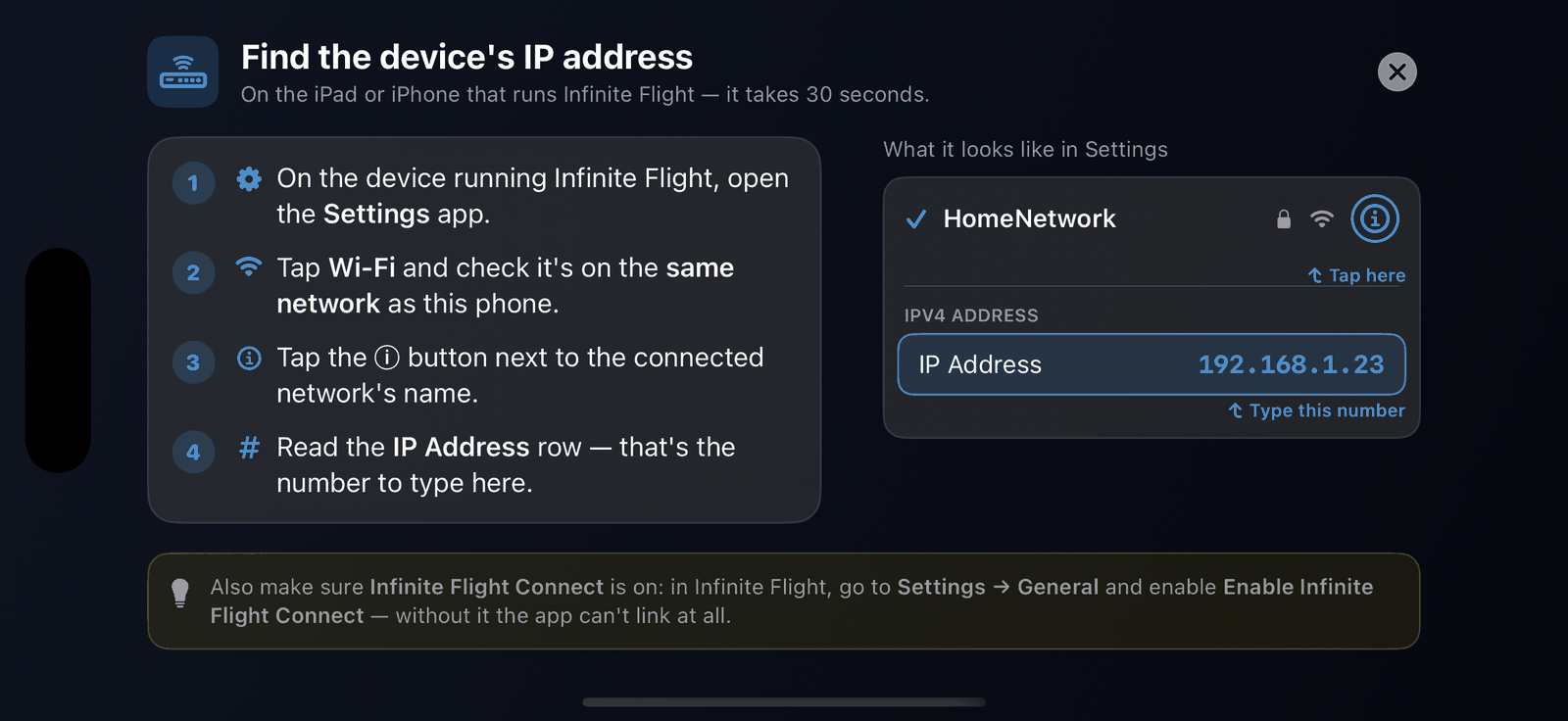
- On the iPad or iPhone running Infinite Flight, open the Settings app.
- Tap Wi-Fi and check it is connected to the same network as your iPhone.
- Tap the ⓘ button next to the connected network's name.
- Read the IP Address row, for example 192.168.1.23.
- In SkyYoke, tap Enter IP manually, type the address and connect. The port is always 10112.
Tip
Also make sure Enable Infinite Flight Connect is on in Infinite Flight's Settings → General. Without it, the address is right but nothing answers.
Good to know#
- Home routers can give the iPad a new address after a restart. If a saved address stops working, look it up again.
- If you use the iPhone's Personal Hotspot, the Infinite Flight device usually gets an address starting with 172.20.10.